All integrations

GitHub Actions

Push CI status to your phone while you grab coffee.

LiveCI / CDenv var
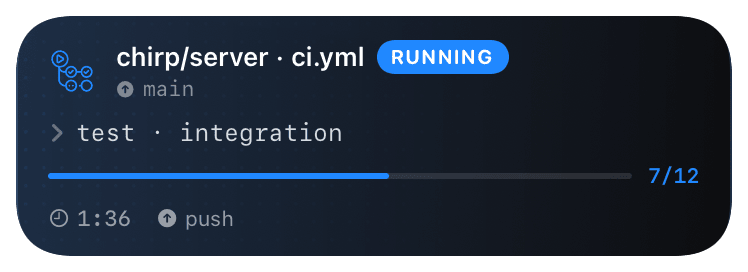
gh-actions (running) Live Activity preview
what shows on your phone

Today's GitHub Actions integration is the bash helper sourced into any `run:` step - same shell helpers Chirp ships for Bitbucket Pipelines, Docker, raw bash. Set `CHIRP_API_KEY` as a repo secret, source `chirp.sh`, and wrap your command with `chirp_wrap`. Card opens on start, closes green/red based on the wrapped command's exit code.

A first-class composite action (`uses: chirp/chirp-action@v1`) is in progress - it'll give you per-step `action: start / update / end` granularity instead of bracketing inside one shell. For now the bash helper covers the same ground with two extra lines of YAML. Status of the composite action: not yet published to the Marketplace; tracking issue in the Chirp repo.

If you want zero workflow edits, configure a GitHub repo webhook (Settings → Webhooks) pointing at `https://api.chirpapp.dev/v1/webhooks/github?key=...` and tick `workflow_run` - see the GitHub webhook integration. That gets you basic build cards without touching any workflow YAML, at the cost of fine-grained progress.

Prerequisites

  • A GitHub repository with at least one workflow.
  • Your Chirp API key from chirpapp.dev/dashboard (starts with `chirp_sk_`).
  • Repo admin or maintainer permissions to add a secret.

Setup

  1. 1

    Add CHIRP_API_KEY as a repo secret

    Settings → Secrets and variables → Actions → New repository secret. Name CHIRP_API_KEY, paste the value from chirpapp.dev/dashboard. Org-level secrets work the same way if you want to share across repos.

  2. 2

    Source the helpers + wrap your command

    In any run: step, source chirp.sh from the connectors URL and call chirp_wrap. The helper handles start/end events; exit code propagates so the card closes green on 0, red on non-zero.

    .github/workflows/deploy.yml
    name: Deploy
    on:
      push:
        branches: [main]
    
    jobs:
      deploy:
        runs-on: ubuntu-latest
        env:
          CHIRP_API_KEY: ${{ secrets.CHIRP_API_KEY }}
        steps:
          - uses: actions/checkout@v4
    
          - name: Build
            run: |
              source <(curl -fsSL https://chirpapp.dev/connectors/bash/chirp.sh)
              chirp_wrap @build "ci-${{ github.run_number }}" -- npm run build
    
          - name: Deploy
            run: |
              source <(curl -fsSL https://chirpapp.dev/connectors/bash/chirp.sh)
              chirp_wrap @deploy "prod-${{ github.sha }}" -- ./scripts/deploy.sh
  3. 3

    (Optional) Manual start/update/end across steps

    When you need finer granularity than chirp_wrap (e.g. you want one activity that spans build → test → deploy with progress updates), use the lower-level helpers. chirp_start returns an activity ID via $CHIRP_ACTIVITY_ID; subsequent steps that source the helper script see it in the env.

    shell
    jobs:
      deploy:
        runs-on: ubuntu-latest
        env:
          CHIRP_API_KEY: ${{ secrets.CHIRP_API_KEY }}
        steps:
          - id: chirp_start
            run: |
              source <(curl -fsSL https://chirpapp.dev/connectors/bash/chirp.sh)
              chirp_start @deploy "ci-${{ github.run_id }}" '{"stage":"build"}'
              echo "activity_id=$CHIRP_ACTIVITY_ID" >> $GITHUB_OUTPUT
    
          - run: npm ci && npm run build
    
          - run: |
              source <(curl -fsSL https://chirpapp.dev/connectors/bash/chirp.sh)
              CHIRP_ACTIVITY_ID="${{ steps.chirp_start.outputs.activity_id }}" \
                chirp_update '{"stage":"deploying","progress":0.7}'
    
          - run: ./scripts/deploy.sh
    
          - if: always()
            run: |
              source <(curl -fsSL https://chirpapp.dev/connectors/bash/chirp.sh)
              CHIRP_ACTIVITY_ID="${{ steps.chirp_start.outputs.activity_id }}" \
                chirp_end

What you’ll see

Card header: Octocat logo + the schema's prefix (DEPLOY / BUILD) + name from chirp_wrap + repo path. Action line shows the wrapped command. Closes green on exit 0, red on non-zero. Failure cards include the last few lines of stderr from the wrapped command. Tap the card to open the workflow run page in GitHub.

Troubleshooting

Step fails with `chirp_wrap: command not found`.
The source <(curl ...) line didn't run successfully - usually a network blip or a sh-only runner. Check the step output for the curl error. As a fallback, fetch the script first and source from a file: `` - run: curl -fsSL https://chirpapp.dev/connectors/bash/chirp.sh -o /tmp/chirp.sh - run: | source /tmp/chirp.sh chirp_wrap @deploy ...
Card never appears even though the step ran.
Check that CHIRP_API_KEY is on the env. The helper silently no-ops when the env var is empty (intentional: Chirp can never break a CI run). To debug, add set -x before sourcing - you'll see whether the helper reaches the API call.
Forked-PR builds don't post to Chirp.
GitHub doesn't expose secrets to workflows triggered by PRs from forks (security feature). Either gate the Chirp step on if: github.event.pull_request.head.repo.full_name == github.repository, or use pull_request_target for the workflow if you understand the implications.
I want one activity that spans multiple jobs, not multiple steps.
Cross-job state requires outputs: between jobs (or an external store). Pattern: job A's chirp_start writes activity_id to a job output; job B reads it via needs.A.outputs.activity_id. The lower-level helpers (chirp_start / chirp_update / chirp_end) accept CHIRP_ACTIVITY_ID from env to coordinate.