All integrations

GitLab CI

Self-hosted GitLab or gitlab.com - same CI story as GitHub.

LiveCI / CDenv var
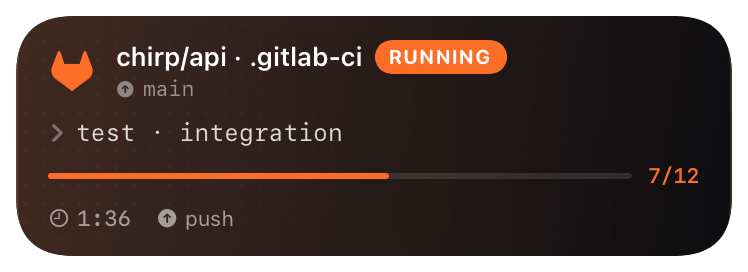
gitlab-ci (running) Live Activity preview
what shows on your phone

Chirp ships a remote `include:` template for GitLab CI that exposes a `.chirp` job extension and a set of `!reference` script blocks. Any job that needs Chirp reporting just `extends: .chirp` and references the start/end blocks at the top and bottom of its script. No Docker image, no plugin install, no runner privileges beyond `curl`.

Works identically on gitlab.com SaaS and self-hosted. The only requirement is that your runner has internet access to the Chirp API - air-gapped runners can self-host the connector by mirroring `chirp.gitlab-ci.yml` and pointing the `include:` at the internal copy.

Prerequisites

  • A GitLab project with maintainer access (needed to add CI/CD variables).
  • A runner that can hit `api.chirpapp.dev` (any GitLab.com shared runner qualifies).
  • A Chirp API key from chirpapp.dev/dashboard.

Setup

  1. 1

    Add CHIRP_API_KEY as a masked + protected variable

    GitLab project → Settings → CI/CD → Variables → Add variable. Name CHIRP_API_KEY, value is your dashboard key (starts with chirp_sk_). Tick **Mask variable** (hides it from logs) and **Protected** (only injects on protected branches/tags). The remote template reads from this exact name.

  2. 2

    Include the remote template

    Drop the include: line at the top of your .gitlab-ci.yml. GitLab fetches the template once per pipeline and caches it. The template defines .chirp plus .chirp_send_start, .chirp_send_update, .chirp_send_end, .chirp_send_notify script blocks.

    .gitlab-ci.yml
    include:
      - remote: https://chirpapp.dev/connectors/gitlab-ci/chirp.gitlab-ci.yml
  3. 3

    Wrap a job with extends + !reference

    Any job that wants Live Activity reporting extends: .chirp and references the start/end blocks. The blocks read CHIRP_API_KEY from the environment, post to the Chirp API, and silently swallow non-2xx responses so a Chirp outage never fails your pipeline.

    .gitlab-ci.yml
    deploy:prod:
      extends: .chirp
      variables:
        CHIRP_SCHEMA: "@deploy"
      script:
        - !reference [.chirp_send_start, script]
        - ./deploy.sh
        - !reference [.chirp_send_end, script]
      rules:
        - if: '$CI_COMMIT_TAG'
  4. 4

    (Optional) Tick progress mid-job

    For long-running jobs, splice !reference [.chirp_send_update, script] between phases. Each update bumps the progress bar and appends to the activity timeline.

    shell
    script:
      - !reference [.chirp_send_start, script]
      - npm ci
      - export CHIRP_PROGRESS=0.3 && !reference [.chirp_send_update, script]
      - npm run build
      - export CHIRP_PROGRESS=0.7 && !reference [.chirp_send_update, script]
      - npm run deploy
      - !reference [.chirp_send_end, script]

What you’ll see

Card header: GitLab orange logo + "GitLab · DEPLOY" + repo path (`group/project`). Action line shows pipeline ID and current job. The end block reads `$CI_JOB_STATUS` so the activity closes green on success, red on failure or canceled. Tap the card to deep-link back to the pipeline page in GitLab. Multiple parallel jobs in the same pipeline show as separate cards keyed by job name - set `CHIRP_KEY: $CI_PIPELINE_ID` on the job to coalesce them into one.

Troubleshooting

Pipeline starts but no card appears.
Check the runner has outbound HTTPS to api.chirpapp.dev. Most self-hosted runners behind corporate proxies need HTTPS_PROXY set. Run curl -v https://api.chirpapp.dev/v1/health in a debug job to verify.
CHIRP_API_KEY shows as `[masked]` in logs but Chirp still 401s.
Mask only hides the value in UI logs - the value still gets passed through. A 401 means the key itself is bad or for the wrong account. Regenerate from chirpapp.dev/dashboard and re-paste; don't copy from a screenshot.
Card doesn't close on canceled jobs.
GitLab fires after_script: even on cancel; move the end block there instead of inline at the script tail. The remote template's .chirp_send_end_after_script ref handles this - see the template's commented examples.
Self-hosted GitLab can't reach the remote include.
Mirror chirp.gitlab-ci.yml into your internal GitLab and reference it as include: project: 'group/chirp-ci' file: '/chirp.gitlab-ci.yml' instead of remote:. The template is plain YAML with no external dependencies.