All integrations

Raw HTTP

Languages without an SDK, embedded systems, one-offs.

LiveWebhookenv var
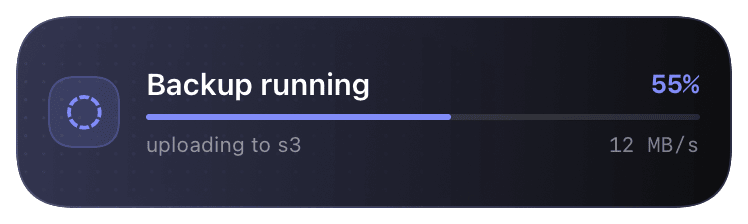
progress (primary) Live Activity preview
raw API call

When there's no SDK and no third-party integration, you have the raw HTTP API. The core endpoints: `/v1/activity/start` opens a Live Activity, `/v1/activity/update` ticks state, `/v1/activity/end` closes it, `/v1/notify` fires a one-shot push without a persistent activity. Auth is bearer token via the `Authorization` header.

Routing identity is `(schema_id, instance_id)`. You usually don't pass `instance_id` - the server smart-routes by id-key match (repo, session_id, task_id, etc.) so retries of the same flow merge into the same card and parallel flows land in distinct cards. Pass `instance_id` explicitly when you want guaranteed routing across two parallel runs of the same template.

Use this when you're integrating from a language without a Chirp SDK (Elixir, Crystal, Zig, etc.), from an embedded device, or from a one-off bash script where pulling in the SDK isn't worth it. Every other Chirp integration is a thin wrapper over these endpoints.

Prerequisites

  • A Chirp API key set in the calling environment (`$CHIRP_API_KEY`).
  • Anything that can speak HTTPS + JSON.

Setup

  1. 1

    Set the API key in your environment

    Get the key from chirpapp.dev/dashboard. Export it in whatever runtime your code lives in - shell profile, CI secret, Docker env-file, K8s secret. The Chirp API expects it on the Authorization header.

    shell
    export CHIRP_API_KEY=chirp_sk_...
  2. 2

    POST /v1/activity/start

    Opens a Live Activity. schema_id picks the layout (@agent, @deploy, etc.); data is the schema-specific payload. Response includes instanceIds (one per device the user has registered) and the resolved instance_id the server picked for routing. Identify subsequent /update and /end calls with the same (schema_id, instance_id) tuple - not the per-device instance UUIDs.

    curl
    curl -X POST https://api.chirpapp.dev/v1/activity/start \
      -H "Authorization: Bearer $CHIRP_API_KEY" \
      -H "Content-Type: application/json" \
      -d '{
        "schema_id": "@agent",
        "data": {
          "agentName":     "embedding-pipeline",
          "statusMessage": "Building chunk index",
          "state":         "working"
        }
      }'
    
    # Response: {"success":true,"instanceIds":["..."],"schema_id":"@agent","instance_id":null}
  3. 3

    POST /v1/activity/update

    Updates the activity in place. Pass the same schema_id you started with. Fields you don't include in data keep their previous value (partial update). When multiple instances of the same schema are running, the server smart-routes to whichever one your payload best matches via id-key fields (repo, session_id, etc.) - pass instance_id if you want explicit targeting.

    curl
    curl -X POST https://api.chirpapp.dev/v1/activity/update \
      -H "Authorization: Bearer $CHIRP_API_KEY" \
      -H "Content-Type: application/json" \
      -d '{
        "schema_id": "@agent",
        "data":      {"statusMessage": "Uploading", "progress": 0.85}
      }'
  4. 4

    POST /v1/activity/end

    Closes the activity. Pass schema_id (and optional instance_id to end just one of several parallel cards). Optional dismissal_policy controls how long the final state lingers on the lock screen. Without instance_id, ALL active instances of that schema_id are ended.

    curl
    curl -X POST https://api.chirpapp.dev/v1/activity/end \
      -H "Authorization: Bearer $CHIRP_API_KEY" \
      -H "Content-Type: application/json" \
      -d '{
        "schema_id":        "@agent",
        "dismissal_policy": {"afterSeconds": 60}
      }'
  5. 5

    (Parallel cards) Pass instance_id for two of the same template at once

    Same template, different work - e.g. two @deploy flows on different repos. Pass a stable instance_id derived from the work itself (the repo slug, a session id) so each call routes deterministically.

    curl
    # First parallel card
    curl -X POST https://api.chirpapp.dev/v1/activity/start \
      -H "Authorization: Bearer $CHIRP_API_KEY" -H "Content-Type: application/json" \
      -d '{"schema_id":"@deploy","instance_id":"chirp-app","data":{"repo":"chirp-app","stage":"build","progress":0.1}}'
    
    # Second parallel card - different instance_id, same schema
    curl -X POST https://api.chirpapp.dev/v1/activity/start \
      -H "Authorization: Bearer $CHIRP_API_KEY" -H "Content-Type: application/json" \
      -d '{"schema_id":"@deploy","instance_id":"other-app","data":{"repo":"other-app","stage":"build","progress":0.1}}'
    
    # Update only one
    curl -X POST https://api.chirpapp.dev/v1/activity/update \
      -H "Authorization: Bearer $CHIRP_API_KEY" -H "Content-Type: application/json" \
      -d '{"schema_id":"@deploy","instance_id":"chirp-app","data":{"stage":"deploy","progress":0.7}}'
  6. 6

    (Alternative) POST /v1/notify for one-shot pushes

    When you don't need a persistent activity - just a single notification. Same auth header.

    curl
    curl -X POST https://api.chirpapp.dev/v1/notify \
      -H "Authorization: Bearer $CHIRP_API_KEY" \
      -d '{"title":"Build done","body":"main passed in 4m 12s"}'

What you’ll see

Whatever the schema renders - `@agent` shows agent name + status + state pill; `@deploy` shows repo + stage + progress bar. Multiple parallel instances of the same template show as separate cards on the lock screen, distinguished by their data. The schema docs at chirpapp.dev/templates list every field per schema. State directives (`*Append`, `*LatestOutcome`) work over HTTP exactly like they do via the SDKs.

Troubleshooting

401 unauthorized.
Either the key is wrong, or you're sending it as Authorization: <key> instead of Authorization: Bearer <key>. The Bearer prefix is required.
422 unprocessable entity.
Schema validation failed. The error response includes the failing field path (e.g. data.progress: must be a number between 0 and 1). Check your data shape against the schema docs at chirpapp.dev/templates.
Update went to the wrong card when I have multiple parallels.
Pass instance_id explicitly to disambiguate. Use a stable string derived from the work (repo slug, session id). Without instance_id, the server picks the best id-key match in your payload - usually right but not guaranteed for ambiguous payloads.
I dismissed a card and want it back.
Open the Chirp app → Activities tab → your card is in 'Running' or 'Recently ended' → tap Re-push. Or chirp activity list then chirp activity retrigger <instanceId> from the CLI.