All integrations

Kiro CLI

Amazon Kiro spec-driven agent - schema near-identical to Claude Code.

LiveEditorchirp login
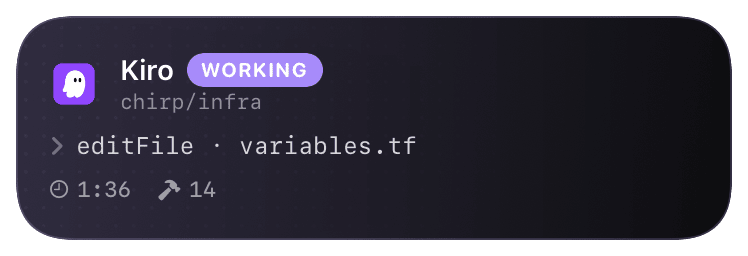
kiro (working) Live Activity preview
what shows on your phone

Kiro is Amazon's spec-driven coding agent - you give it a markdown spec, it produces code, tests, and a verification trace. The hook system is a near-clone of Claude Code's: agentSpawn, preToolUse, postToolUse, stop, plus Kiro-specific specCompiled and specVerified events for the spec-loop semantics.

Hooks are declared inline in `.kiro/agent.yaml` (vs. Claude Code's separate `settings.json`). The hook runner is whatever you put in the `run:` field - bash, python, node, anything that exits non-zero on failure. Chirp ships a single Python script that handles every event by branching on argv[1].

Prerequisites

  • Kiro CLI installed (`brew install amazon/kiro/kiro` or the official installer).
  • Chirp installed on your phone, signed in.
  • Run `chirp login` once on your laptop - Kiro hooks pick up the token from `~/.chirp/credentials`.

Setup

  1. 1

    Drop the hook script into your project

    Single Python script handles every Kiro hook event. Reads the event JSON from stdin, posts to Chirp's normalizer for the @kiro activity. The script branches on the first CLI arg (which agent.yaml passes in) so one file covers all five lifecycle events.

    .kiro/chirp-hook.py
    #!/usr/bin/env python3
    """Kiro → Chirp bridge. agent.yaml passes the event name as argv[1]."""
    import sys, json, os, urllib.request
    
    def main():
        event = sys.argv[1] if len(sys.argv) > 1 else "unknown"
        payload = sys.stdin.read()  # Kiro pipes the event JSON on stdin
        token = open(os.path.expanduser("~/.chirp/credentials")).read().strip()
    
        req = urllib.request.Request(
            f"https://api.chirpapp.dev/v1/webhooks/kiro?event={event}",
            data=payload.encode(),
            headers={
                "Authorization": f"Bearer {token}",
                "Content-Type": "application/json",
            },
        )
        try:
            urllib.request.urlopen(req, timeout=2)
        except Exception:
            pass  # never block the agent - hook failures are fire-and-forget
    
    if __name__ == "__main__":
        main()
  2. 2

    Make it executable

    Kiro skips non-executable hook scripts the same way Cline does - silently. chmod +x once and you're done.

    shell
    chmod +x .kiro/chirp-hook.py
  3. 3

    Wire the hooks block in agent.yaml

    Kiro's hooks block lives at the top level of the agent config. Each hook key maps to a single command - Chirp's script handles the dispatch via argv. If your project already has a hooks block, merge these entries into it; Kiro doesn't allow duplicate keys.

    .kiro/agent.yaml
    # Existing agent config - only the hooks block is new.
    name: my-agent
    spec: ./spec.md
    
    hooks:
      agentSpawn:    { run: "python3 .kiro/chirp-hook.py agentSpawn" }
      preToolUse:    { run: "python3 .kiro/chirp-hook.py preToolUse" }
      postToolUse:   { run: "python3 .kiro/chirp-hook.py postToolUse" }
      specCompiled:  { run: "python3 .kiro/chirp-hook.py specCompiled" }
      specVerified:  { run: "python3 .kiro/chirp-hook.py specVerified" }
      stop:          { run: "python3 .kiro/chirp-hook.py stop" }
  4. 4

    Run a spec

    From the project root: kiro run. Kiro spawns the agent, fires agentSpawn (your card appears on the lock screen), runs the spec compile loop, and fires postToolUse / specCompiled / specVerified as it goes. The card closes on stop with the spec-pass/spec-fail outcome.

    shell
    kiro run

What you’ll see

Card header: Kiro orange logo + "Kiro · WORKING" + spec name (basename of `spec:` from agent.yaml). Action line shows the current tool or spec phase - `compiling spec`, `running tests`, `apply_patch · src/auth.ts`. The Chirp activity treats specCompiled and specVerified as milestone events - they get a small badge on the timeline ("spec ✓" green or "spec ✗" red). On stop, the card closes green if specVerified passed, red otherwise. The spec name is the persistent identifier across reruns, so multiple `kiro run` invocations on the same spec coalesce into one card.

Troubleshooting

agent.yaml fails to parse after adding the hooks block.
Kiro's YAML parser is strict - make sure the hooks block is at the top level (same indent as name: and spec:), not nested under another key. Run kiro validate to get line-level errors before kiro run.
Card appears but never updates with tool calls.
preToolUse and postToolUse only fire if the agent actually calls a tool. A spec that only does pure-text reasoning won't generate update events. Add --verbose to kiro run to confirm tool calls are happening.
Hook script crashes on first run with a credentials error.
Run chirp login first - the script reads ~/.chirp/credentials. If you don't want to install the Chirp CLI, swap the auth header for a webhook URL with ?key=... (drop the Authorization line entirely) and use the @cline-style fire-and-forget pattern.
specCompiled / specVerified events never fire.
These are Kiro-version-gated. Older Kiro builds (pre-0.5) only emit agentSpawn/preToolUse/postToolUse/stop. Run kiro --version and upgrade if needed; the simpler four-hook setup still works fine on older Kiro.
External docs →