Modal
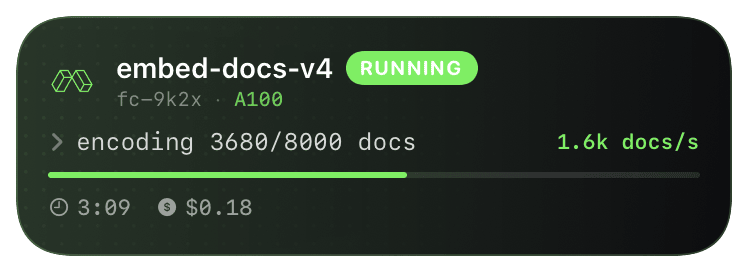
Long-running Modal functions - phone shows queued → running → done.

Modal doesn't yet expose lifecycle webhooks for `@app.function` invocations (web endpoints have webhooks, but background functions don't). The cleanest pattern is in-process: install the Chirp Python SDK in your Modal image and wrap the function body with `chirp.activity(...)`. Same pattern as the @track decorator on a local Python script - except Modal's image rebuild cache means you only pay the SDK install cost once.
The activity context manager opens a Live Activity on `__enter__`, fires `update()` calls on demand, and closes on `__exit__` - the closure color is determined by whether the function exited cleanly or raised. So a Modal function that hits an OOM or timeout closes the card red automatically without you writing a try/except.
Prerequisites
- A Modal account + `modal token new` configured locally.
- A Chirp account paired via `chirp login`.
Setup
- 1
Add chirp-sdk to your Modal image
Modal images are layer-cached - the SDK install happens once per image hash. ~200KB pure-Python wheel, no native deps, builds in <2s.
modal_app.pyimport modal image = modal.Image.debian_slim().pip_install("chirp-sdk") app = modal.App("embed-docs", image=image) - 2
Pass your Chirp credential as a Modal secret
Modal functions don't see your local
~/.chirp/credentials. Create a Modal secret holding your API key and inject it at function definition time.shellmodal secret create chirp-creds CHIRP_API_KEY=$(chirp login --print-token) - 3
Wrap the function body with chirp.activity
Context manager pattern:
__enter__opens,update()ticks,__exit__closes (green on clean exit, red on exception). The schema@modalrenders the GPU type, job name, and progress bar.modal_app.pyimport modal, chirp image = modal.Image.debian_slim().pip_install("chirp-sdk") app = modal.App("embed-docs", image=image) @app.function( image=image, gpu="A100", secrets=[modal.Secret.from_name("chirp-creds")], timeout=3600, ) def run(batches): with chirp.activity("@modal", { "jobName": "embed-docs-v4", "gpuType": "A100", }) as a: for i, batch in enumerate(batches): embed(batch) a.update({"progress": (i + 1) / len(batches)}) @app.local_entrypoint() def main(): run.remote(load_batches()) - 4
(Optional) Per-stage breakdown
For multi-phase work (download → train → eval → upload), pass
stageNoteon eachupdate(). The activity timeline appends each stage transition as a checkmark.pythonwith chirp.activity("@modal", {"jobName": "qwen-ft"}) as a: a.update({"stageNote": "downloading dataset", "progress": 0.1}) download() a.update({"stageNote": "training", "progress": 0.5}) train() a.update({"stageNote": "uploading checkpoint","progress": 0.9}) upload()
What you’ll see
Card header: Modal logo + "Modal · RUNNING" + jobName. Action line shows GPU type, current stage, and progress bar. Closes green on clean exit; red with the exception class + message on raise (Modal surfaces OOM, timeout, and worker-killed as distinct exception types - the card shows whichever one fired). Tap the card to deep-link to the Modal dashboard's run page.
Troubleshooting
- ImportError: No module named chirp.
- The image's
pip_installran on a different image variant than the one the function is using. Verify withmodal app listthat the image hash matches your function'simage=. Most common cause: definingimageinside a notebook cell that ran out of order. - Card never appears even though Modal logs show the function ran.
- Modal secret didn't inject. Inside the function:
os.getenv('CHIRP_API_KEY')should be non-empty. If it is empty, the function'ssecrets=is missing or pointing at a secret that doesn't have CHIRP_API_KEY as a key. - Card stuck at "running" after the function timed out.
- Modal's hard timeout SIGKILLs the worker without giving the SDK a chance to close the activity. Set Modal's
timeout=to slightly less than your activity's heartbeat tolerance (default 4h), or calla.update({"progress": 1})periodically - Chirp auto-closes activities with progress=1 after a grace period.