OpenCode
SST OpenCode TUI - first-class permission.asked event.

OpenCode (the SST-built terminal coding agent) ships a first-class plugin API - a single JS file in `~/.config/opencode/plugins/` is auto-loaded on startup. No hook directories, no shell scripts, no shebangs to fight. Plugins subscribe to events with an `on:` map; OpenCode invokes the handlers in-process.
OpenCode is the only mainstream coding agent with a dedicated `permission.asked` event. When the agent wants to run a destructive command (rm -rf, force-push, db migration), it pauses and emits permission.asked with the proposed action. Chirp surfaces this as a special "awaiting approval" state on the lock screen - useful for long-running runs you've stepped away from.
Prerequisites
- OpenCode installed (`brew install sst/tap/opencode` or `curl -fsSL https://opencode.ai/install | bash`).
- Chirp installed on your phone, signed in.
- A Chirp inspector/webhook URL - generate one at chirpapp.dev/dashboard.
Setup
- 1
Drop the plugin into the OpenCode plugins directory
OpenCode scans
~/.config/opencode/plugins/on startup and loads every.js/.tsfile as an ES module. The default export is the plugin descriptor - an object with anon:map of event handlers. No registration, no manifest.~/.config/opencode/plugins/chirp.js// Single-file OpenCode plugin. Auto-loaded - no manifest needed. const URL = "https://api.chirpapp.dev/v1/webhooks/opencode?key=YOUR_KEY"; const post = (op, event) => { // Fire-and-forget; we never want to block the agent on Chirp. fetch(`${URL}&op=${op}`, { method: "POST", headers: { "Content-Type": "application/json" }, body: JSON.stringify(event), }).catch(() => {}); }; export default { name: "chirp", on: { "session.created": e => post("start", e), "tool.execute.before": e => post("update", e), "tool.execute.after": e => post("update", e), "permission.asked": e => post("permission", e), "permission.granted": e => post("update", e), "session.idle": e => post("end", e), "session.error": e => post("end", e), }, }; - 2
Replace YOUR_KEY with your webhook key
Open chirpapp.dev/dashboard → Webhook URLs → "OpenCode" preset. Copy the key (starts with
chirp_sk_) and paste it in place ofYOUR_KEYin the URL. The key is the only secret in this file - the URL itself is fine to commit. - 3
Restart OpenCode
OpenCode loads plugins on startup only - there's no hot-reload. Quit the TUI (
/quitor Ctrl+C twice) and relaunch. Runopencode --debug-pluginsif you want to confirm the plugin loaded; you'll see[plugin:chirp] loadedin the logs.shellopencode --debug-plugins - 4
(Optional) Per-project plugin
For repos where you want different webhook URLs per project (e.g. a different inspector for work vs. personal projects), put the plugin in
<project>/.opencode/plugins/chirp.jsinstead. OpenCode merges per-project plugins on top of the global ones.
What you’ll see
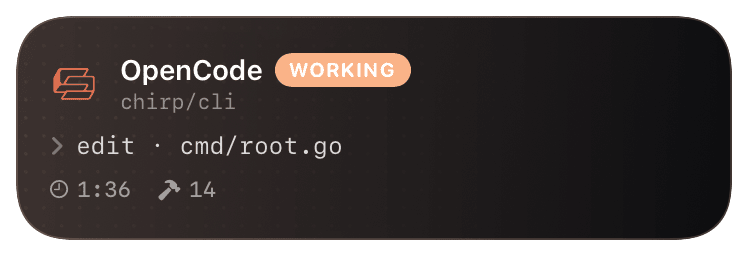
Card header: OpenCode mark + "OpenCode · WORKING" + session name. Action line shows the current tool - `bash · pnpm test`, `edit · src/auth.ts`. On `permission.asked`, the card flips to a yellow "AWAITING APPROVAL" state with the proposed command quoted (`opencode wants to: rm -rf node_modules`) - tap the card to deep-link back to the OpenCode TUI on your laptop. After `permission.granted` it flips back to working. `session.idle` closes the card with the last assistant message; `session.error` closes it red with the error reason.
Troubleshooting
- Plugin doesn't load - `[plugin:chirp] loaded` never appears.
- Check the file extension is
.jsor.ts(not.mjs) and the file has a default export. OpenCode parses with esbuild's loose mode - common mistake is using CommonJS (module.exports = ...); switch toexport default .... - permission.asked card never appears even though OpenCode is asking for permission in the TUI.
- OpenCode's permission.asked event only fires for tools that have a permission gate configured. Check
~/.config/opencode/config.toml-[permissions]block must list the tools (bash,write) you want to gate. Tools not in that block run without firing the event. - Card briefly appears, then never updates.
- fetch() is non-blocking but still returns a promise - make sure you're not awaiting it (or your handler will block OpenCode's event loop until the request completes). The
.catch(() => {})pattern in the snippet is intentional fire-and-forget. - Multiple OpenCode sessions all show up as one card.
- OpenCode's
session.idis the dedupe key. If your plugin is collapsing sessions, double-check you're postinge(the full event) rather than a custom payload that strips the ID - Chirp's normalizer keys offevent.session.id.