All integrations

OpenRouter Spend

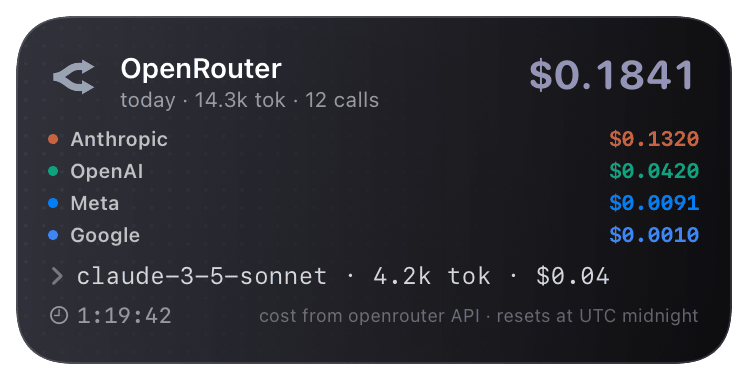
Daily AI API spend on your lock screen - cost figure pulled from OpenRouter's response, not a maintained rate table.

LiveServicechirp login
openrouter-spend (live-multi-provider-day) Live Activity preview
today's spend

OpenRouter is a meta-API for LLMs: one HTTP endpoint, OpenAI-compatible request/response shape, but it routes your call to whichever underlying provider hosts the model you asked for (Anthropic, OpenAI, Meta, Mistral, Google, xAI, 300+ models in total). Every response includes a `usage.cost` field - the actual dollars OpenRouter is billing your account for that call.

@openrouter-spend uses that field verbatim. There is zero pricing logic on Chirp's side. When OpenRouter raises Claude Opus's price tomorrow, your lock screen is automatically correct on the next call. No SDK upgrade, no rate-table push, nothing to maintain.

Prerequisites

  • An OpenRouter account at openrouter.ai with at least $1 of credit (free signup, free trial credits available).
  • An app that's already calling OpenRouter (or that you can switch to OpenRouter - it's drop-in OpenAI-compatible).
  • Chirp installed on your phone, signed in.

Setup

  1. 1

    Install the Chirp SDK

    Pick the language matching your app. The SDK is dependency-light: stdlib HTTP for Python, fetch for Node. No external package weight.

    shell
    pip install chirp-sdk
    # or:
    npm install chirp
  2. 2

    Authenticate with `chirp login`

    Opens a browser, pairs your machine with your Chirp account, drops a token at ~/.chirprc. The SDK auto-discovers it. You only do this once per laptop. Crucially, your OpenRouter API key is never asked for or sent - the SDK only uses your Chirp credentials to push token-count + cost telemetry.

    shell
    chirp login
  3. 3

    Wrap your OpenRouter client

    OpenRouter speaks the OpenAI Chat Completions wire format, so most apps already use the official openai package pointed at OpenRouter's base URL. Pass that client through chirp.openrouter.track() - it returns a thin proxy that intercepts every response, reads usage.cost + usage.prompt_tokens + usage.completion_tokens + the model field, and POSTs them to Chirp asynchronously. Your call site is unchanged.

    main.py
    from openai import OpenAI
    import chirp.openrouter
    
    client = OpenAI(
        base_url="https://openrouter.ai/api/v1",
        api_key=OPENROUTER_API_KEY,
    )
    client = chirp.openrouter.track(client)
    
    # All your existing call sites work unchanged.
    response = client.chat.completions.create(
        model="anthropic/claude-3-5-sonnet",
        messages=[{"role": "user", "content": "hello"}],
    )
  4. 4

    (Optional) Tag calls for project-level breakdowns

    Pass a chirp_tag extra header on the request to bucket spend by project, customer, or feature. The dashboard's daily summary endpoint exposes per-tag totals for billing reconciliation.

    python
    response = client.chat.completions.create(
        model="anthropic/claude-3-5-sonnet",
        messages=[...],
        extra_headers={"chirp_tag": "rag-pipeline"},
    )

Raw HTTP (no SDK)

curl
# After your OpenRouter call returns, POST the usage fields verbatim:
curl -X POST https://api.chirpapp.dev/v1/openrouter-usage \
  -H "Authorization: Bearer $CHIRP_API_KEY" \
  -H "Content-Type: application/json" \
  -d '{
    "model": "anthropic/claude-3-5-sonnet",
    "prompt_tokens": 1240,
    "completion_tokens": 320,
    "cost": 0.0145
  }'

What you’ll see

On the first call of the day, an @openrouter-spend Live Activity starts and shows $0.00. Each subsequent call increments the daily total in real time and appends to the per-provider breakdown (Anthropic / OpenAI / Meta / Google etc., each tinted with its real brand color). Verbose mode (toggle in the Chirp app) shows the last 5 calls as a stacked timeline with model + tokens + cost + relative time. Activity rolls over at 00:00 UTC; the previous day's total is preserved on the dashboard.

Troubleshooting

The card shows $0.00 even though my code is calling OpenRouter.
Verify usage.cost is present in the response: print(response.usage). If it's missing, you're hitting the upstream provider directly (not OpenRouter) - check your base_url is https://openrouter.ai/api/v1 and the API key starts with sk-or-.
I'm seeing 401s in my logs from Chirp.
chirp login token expired. Re-run chirp login. Tokens are valid for 90 days; the SDK falls back to silent failure (your LLM call still succeeds) if telemetry can't be sent - your app never breaks because of Chirp.
The daily total isn't matching my OpenRouter dashboard.
Chirp uses UTC midnight for the daily rollover; OpenRouter's dashboard may show your local timezone's day. Compare against OpenRouter's hourly breakdown for an apples-to-apples figure.
Per-provider chips show "unknown" instead of "Anthropic".
OpenRouter's model field is provider/model (e.g. anthropic/claude-3-5-sonnet). If you're calling a custom or fine-tuned model that lacks the prefix, the wrapper falls back to grouping under "openrouter". Pass an explicit provider kwarg to chirp.openrouter.report() if you need to override.
External docs →