Buildkite
Buildkite pipelines - pass/fail without touching pipeline.yml.

Buildkite has a native outbound webhook system at the pipeline level. Chirp is a zero-code integration: paste the webhook URL, pick the events you want, and Chirp normalizes Buildkite's `build.scheduled` / `build.running` / `build.finished` events into a Live Activity.
Unlike GitHub Actions or CircleCI, you don't touch `pipeline.yml` at all. The webhook is a Buildkite UI setting and survives across pipeline rewrites. Buildkite signs every webhook with `X-Buildkite-Token`; the inspector key in the URL is the auth Chirp checks (so keep the URL secret), and the Buildkite token is informational metadata.
Prerequisites
- Buildkite account with maintainer access on the pipeline.
- A Chirp inspector / webhook URL - generate one at chirpapp.dev/dashboard.
Setup
- 1
Open the pipeline notification settings
Buildkite → your pipeline → Settings → Notifications. Click "Add Notification" and pick **Webhook** as the type.
- 2
Paste the Chirp webhook URL
Webhook URL:
https://api.chirpapp.dev/v1/webhooks/buildkite?key=YOUR_KEY. Replace YOUR_KEY with the inspector key from your Chirp dashboard. Buildkite POSTs JSON; Chirp's normalizer maps the event onto the @buildkite schema automatically.shellhttps://api.chirpapp.dev/v1/webhooks/buildkite?key=YOUR_KEY - 3
Pick the events to forward
Tick
build.scheduled,build.running, andbuild.finishedfor the standard Live Activity flow. Optionally enablejob.scheduled/job.started/job.finishedfor per-job updates on the activity timeline (useful for large pipelines with parallel jobs). - 4
Save + trigger a build
Save the notification. The next build fires
build.scheduledimmediately, opening a card on your phone. The card updates as jobs run and closes green/red onbuild.finished. No code changes; no pipeline.yml edits.
What you’ll see
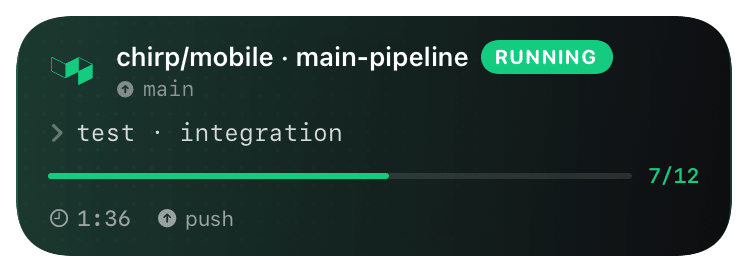
Card header: Buildkite green logo + "Buildkite · BUILDING" + pipeline name + branch. Action line shows the current job (`agent-1: pnpm test`). The activity timeline appends each `job.finished` event as a checkmark or X. On `build.finished`, the card closes with the build state - `passed` (green), `failed` (red), `canceled` (orange), `blocked` (yellow if waiting on a block step). Tap the card to deep-link to the build page in Buildkite.
Troubleshooting
- Webhook saves but no card appears on a build.
- Buildkite's notification is per-pipeline, not org-wide. Confirm the webhook lives on the specific pipeline that's running. Buildkite → Pipeline → Settings → Notifications → look for the chirpapp.dev URL.
- Card opens but never closes.
- You probably didn't enable
build.finished. Without it, Chirp only sees scheduled + running events and waits forever. Re-edit the webhook and tick the finished event. - Card opens twice for one build.
- If you have both an org-level webhook and a pipeline-level webhook pointing at the same Chirp key, Buildkite fires both. Remove one - pipeline-level is preferred (more granular).