Claude Code
Long-running Claude Code sessions - phone shows Claude is working.

Claude Code's hooks system fires a configurable shell command on lifecycle events (SessionStart, PreToolUse, Notification, Stop). The Chirp hook script reads each event's JSON payload from stdin, normalizes it into the @claude-code state shape, and POSTs an activity update.
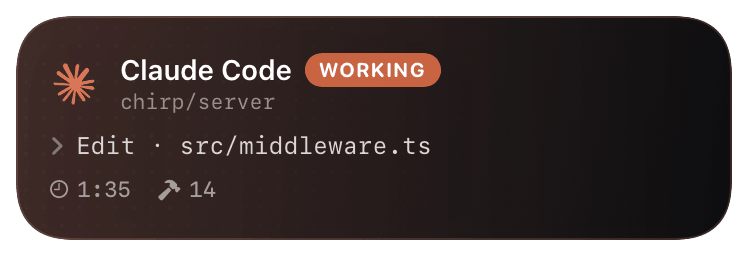
Result: while Claude is working in your terminal, your phone shows a live card - current tool action (`Read · src/middleware.ts`), tool count, elapsed time. When Claude needs your input (permission prompt or idle), the card flips to a `waiting` state with the prompt text. When the session ends, it closes green with the response summary.
Prerequisites
- Claude Code CLI installed (`code.claude.com/install`).
- Chirp installed on your phone, signed in.
- Python 3.9+ on your laptop.
Setup
- 1
Install + authenticate Chirp
The hook script reads
~/.chirprcfor the auth token, same as the Python SDK. Onechirp logincovers both.shellpip install chirp-sdk chirp login - 2
Drop the hook script
Single-file Python script - pure stdlib, no external imports beyond
chirp. Lives in~/.claude/hooks/so Claude can find it.shellmkdir -p ~/.claude/hooks curl -fsSL https://chirpapp.dev/hooks/claude-code.py \ -o ~/.claude/hooks/chirp-hook.py chmod +x ~/.claude/hooks/chirp-hook.py - 3
Wire the hooks in settings.json
Append the hooks block to
~/.claude/settings.json. Claude reads this on launch - restart any active Claude Code sessions for changes to take effect. We listen to four events: SessionStart, PreToolUse, Notification, Stop. The script's first arg distinguishes which event called it.~/.claude/settings.json{ "hooks": { "SessionStart": [ { "hooks": [{ "type": "command", "command": "python3 ~/.claude/hooks/chirp-hook.py SessionStart" }] } ], "PreToolUse": [ { "hooks": [{ "type": "command", "command": "python3 ~/.claude/hooks/chirp-hook.py PreToolUse" }] } ], "Notification": [ { "hooks": [{ "type": "command", "command": "python3 ~/.claude/hooks/chirp-hook.py Notification" }] } ], "Stop": [ { "hooks": [{ "type": "command", "command": "python3 ~/.claude/hooks/chirp-hook.py Stop" }] } ] } } - 4
(Optional) Tweak which events fire
If you find PreToolUse too chatty (one card update per tool call), drop it from the hooks block - SessionStart + Stop alone gives you a simpler "Claude is working / done" card without per-tool granularity. Verbose mode in the Chirp app shows the timeline of recent tool calls when PreToolUse is enabled.
What you’ll see
When you start a Claude Code session, an @claude-code Live Activity appears with `Claude Code · WORKING` and the project (cwd basename) as subtitle. Each tool call updates the action line - `Edit · src/middleware.ts`, `Bash · npm test`, etc. - and bumps the tool counter. When Claude wants permission (e.g. for a destructive Bash command), the card flips amber with the prompt text. Session end closes the card green with `Response complete` and the final tool count. Verbose mode shows the last 5 tool calls as a timeline, each with ok/fail status and elapsed time.
Troubleshooting
- Card never appears when I run Claude Code.
- Run
cat ~/.claude/settings.json | jq .hooksto confirm the hooks block parsed. Run the hook script manually to check it works:echo '{"hook_event_name":"SessionStart"}' | python3 ~/.claude/hooks/chirp-hook.py SessionStart. If you see an HTTP error, yourchirp logintoken expired - re-runchirp login. - I get one card update per tool call and it's overwhelming.
- Two options: (1) remove PreToolUse from settings.json so the card only updates at session boundaries; (2) toggle verbose mode off in the Chirp app - the same data is captured server-side but the lock screen card stays compact.
- Chirp shows `waiting` but Claude finished a long time ago.
- Claude's hooks system fires Notification when Claude is asking for permission OR going idle. If your session was force-quit (closed terminal, sleep), the Stop hook didn't fire and the card is stuck in its last state. Pull-to-dismiss in the Chirp app, or it auto-expires after 4 hours.
- Hooks aren't firing in Claude Code's container/Codespace mode.
- Container Claude runs with restricted FS access. Mount your
~/.claude/hooks/dir into the container or use environment-variable auth: setCHIRP_API_KEYin the container's env and remove the~/.chirprcdependency.