All integrations

Cline

Cline VS Code agent - including the unique TaskResume state.

LiveEditorsigned URL
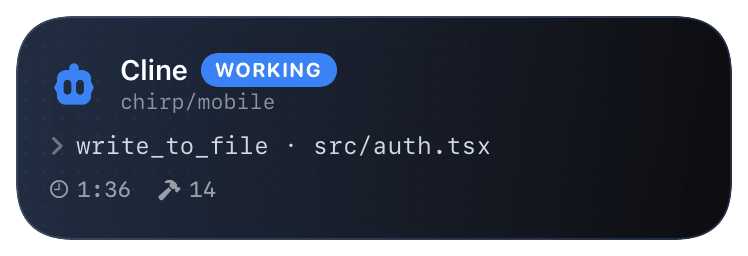
cline (working) Live Activity preview
what shows on your phone

Cline's hooks system runs executable scripts in a Hooks/ directory; each script gets the hook event JSON on stdin. The integration here is the simplest of all our coding-agent setups: a one-line bash script that pipes stdin into curl. No Chirp SDK, no Python, no environment variables - just a URL.

Cline is unique in the agent space for its `TaskResume` event - it can resume a paused task mid-flight and fires that hook to signal the resumption. The Chirp activity treats it like a fresh `TaskStart`, so a resumed task appears as a new card on your phone (vs. continuing the prior one).

Prerequisites

  • Cline installed in VS Code (or a fork like Cursor).
  • Chirp installed on your phone, signed in.
  • A Chirp inspector/webhook URL - generate one at chirpapp.dev/dashboard.

Setup

  1. 1

    Pick your hooks scope

    Cline reads hooks from two places: ~/Documents/Cline/Hooks/ (global, applies to every workspace) or <project>/.clinerules/hooks/ (per-project, committable to the repo). Global is fine for personal use; per-project is better for teams who want consistent reporting.

  2. 2

    Drop the bash hook script

    Single-line script. The shebang and exec'd curl are everything Cline needs. Different filenames map to different events - pre-tool-use.sh fires on PreToolUse, post-tool-use.sh on PostToolUse, etc. Cline auto-detects the event from the filename.

    ~/Documents/Cline/Hooks/post-tool-use.sh
    #!/usr/bin/env bash
    # Cline pipes the event JSON on stdin. Forward verbatim to Chirp;
    # the server normalizes it for the @cline activity.
    exec curl -sS -X POST --data-binary @- \
      https://api.chirpapp.dev/v1/webhooks/cline?key=YOUR_KEY
  3. 3

    Make the script executable

    Cline silently skips non-executable scripts. chmod +x is the most common gotcha here.

    shell
    chmod +x ~/Documents/Cline/Hooks/post-tool-use.sh
  4. 4

    (Optional) Wire other lifecycle events

    Same one-liner, different filenames. Chirp's @cline schema handles all four events - TaskStart starts the activity, PreToolUse appends to the recent-events timeline, PostToolUse back-fills the outcome, TaskComplete/TaskCancel ends the activity green/red.

    shell
    # All four hooks share the same exec line - different files
    # trigger different events. Make sure each is +x.
    cp ~/Documents/Cline/Hooks/post-tool-use.sh \
       ~/Documents/Cline/Hooks/task-start.sh
    cp ~/Documents/Cline/Hooks/post-tool-use.sh \
       ~/Documents/Cline/Hooks/pre-tool-use.sh
    cp ~/Documents/Cline/Hooks/post-tool-use.sh \
       ~/Documents/Cline/Hooks/task-complete.sh
    chmod +x ~/Documents/Cline/Hooks/*.sh
  5. 5

    Reload the VS Code extension

    Cline picks up new hooks on extension load. Cmd+Shift+P → "Developer: Reload Window" or just restart VS Code. From the next Cline session onward, every event flows to your phone.

What you’ll see

Card header: Cline logo + "Cline · WORKING" in cline.bot blue + project name (workspaceRoots[0] basename). Action line shows the current tool call (`read_file · src/auth.tsx`, `execute_command · yarn test`). Verbose mode shows the timeline of recent tool calls. TaskComplete closes the card green with the success message; TaskCancel closes it red. TaskResume on a previously-cancelled task starts a new card with a small "resumed" badge (Chirp-specific signal that the underlying task is mid-flight, not freshly opened).

Troubleshooting

Card never appears even though Cline is running.
Cline silently skips non-executable hook scripts. Run ls -la ~/Documents/Cline/Hooks/ and confirm the x bit is set on each .sh file. If they're missing the bit, Cline doesn't even log a warning - chmod +x is the fix.
Card stuck in "working" state after Cline finishes.
TaskComplete fires only on successful task end. If you closed VS Code mid-task, no terminal event fires. The card auto-expires after 4 hours; pull-to-dismiss in the Chirp app to clear it sooner.
I want the card to track tasks across multiple VS Code windows.
Each Cline window gets its own taskId, so each opens its own activity. To consolidate, drop the hook in <project>/.clinerules/hooks/ and use a stable workspace identifier as the activity key - see the per-project section in the script.
I'm getting 401 errors in Cline's developer console.
The Chirp webhook URL must include a valid ?key= parameter. Get a fresh one from chirpapp.dev/dashboard → Webhook URLs. The key starts with chirp_sk_ and shouldn't be URL-encoded - paste it as-is.
External docs →