All integrations

Replicate

Replicate predictions - paste a URL on the create call, done.

LiveServicesigned URL
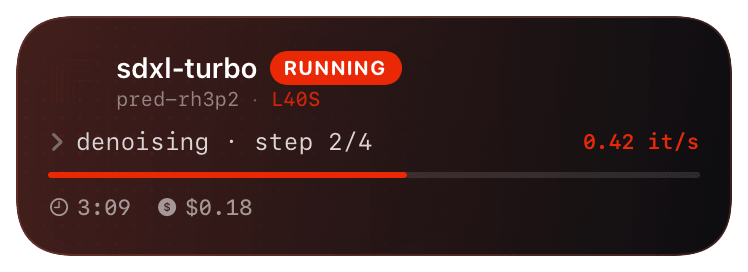
replicate (running) Live Activity preview
what shows on your phone

Replicate's webhook model is per-prediction, not per-account. Every prediction you create can pass a `webhook` URL in the body and Replicate POSTs to it on the events you subscribe to. No dashboard config, no settings page - the webhook is part of the prediction request itself.

This is the cleanest webhook story of any GPU provider: you own which predictions are tracked (don't pass the webhook = no card), and the per-call URL means you can route different jobs to different inspectors. Want only the long-running fine-tunes on your phone? Only pass the webhook on those.

Prerequisites

  • A Replicate account with a token (`$REPLICATE_API_TOKEN`).
  • A Chirp inspector / webhook URL - generate one at chirpapp.dev/dashboard.

Setup

  1. 1

    Add the webhook to your prediction create call

    Two new fields in the JSON body: webhook (the URL) and webhook_events_filter (which events to send). Use ["start","completed"] for the standard Live Activity flow; add "output" if you want progress updates from streaming models.

    shell
    curl https://api.replicate.com/v1/predictions \
      -H "Authorization: Bearer $REPLICATE_API_TOKEN" \
      -H "Content-Type: application/json" \
      -d '{
        "version": "stability-ai/sdxl:39ed52f...",
        "input":   {"prompt": "an astronaut riding a horse"},
        "webhook": "https://api.chirpapp.dev/v1/webhooks/replicate?key=YOUR_KEY",
        "webhook_events_filter": ["start","completed"]
      }'
  2. 2

    Same thing from the official Python client

    The replicate Python SDK accepts the same fields:

    python
    import replicate
    
    prediction = replicate.predictions.create(
        version="stability-ai/sdxl:39ed52f...",
        input={"prompt": "an astronaut riding a horse"},
        webhook="https://api.chirpapp.dev/v1/webhooks/replicate?key=YOUR_KEY",
        webhook_events_filter=["start", "completed"],
    )
  3. 3

    (Optional) Per-job inspector keys

    If you want different jobs reporting to different surfaces (production vs. experimentation, model A vs. model B), generate multiple inspector keys in your dashboard and pass the right URL per call. Chirp routes each one to its own activity stack.

What you’ll see

Card header: Replicate logo + "Replicate · RUNNING" + model name (`stability-ai/sdxl`). Action line shows the prediction ID + elapsed time. On `completed`, the card closes green with the prediction's terminal status (`succeeded`, `failed`, `canceled`). Tap to open the prediction page on replicate.com. If you opted into `output` events, streaming models tick the activity timeline with intermediate outputs (image URL, partial text).

Troubleshooting

Prediction runs but no card appears.
Replicate webhooks are best-effort with no retry. The most common failure mode is a transient network blip. Check your Chirp inspector's recent-events log - if Replicate didn't even attempt the POST, double-check the JSON body actually included the webhook field (their UI silently drops typos like web_hook).
Card never closes.
You forgot "completed" in webhook_events_filter. Replicate only sends events you ask for; without completed, the card hangs at "running" until it auto-expires.
I want to track every prediction without modifying every call.
Replicate doesn't support account-level webhooks. The closest equivalent is wrapping replicate.predictions.create in a helper that always injects the webhook field - see the snippet in the @huggingface walkthrough for the same pattern applied to HF Inference.
External docs →