Sentry
Production errors - know before your users complain.

Sentry's Alerts are rule-based - you define conditions ("more than 10 events in 5 minutes for project X") and actions. Chirp plugs in as a Webhook action. Sentry POSTs the alert payload (issue title, project, level, environment, fingerprint), and Chirp's generic inbound normalizer extracts the title and body for a push notification.
Use Sentry's filters to scope what reaches your phone - by environment (production only), level (error+ only), project, or specific issue. Mixing Chirp into your existing Sentry rules means you don't get a separate alerting product to maintain.
Prerequisites
- A Sentry account with project admin access.
- A Chirp inspector / webhook URL.
Setup
- 1
Pick or create an Alert Rule
Sentry → Alerts → "Create Alert" (or edit an existing rule). Issue Alerts fire on event/issue changes; Metric Alerts fire on quantitative thresholds. Both support webhook actions.
- 2
Add a webhook action
In the alert rule's Actions section, add: "Send a notification via a webhook". Sentry has two ways to do this - the modern Internal Integration (recommended) or the legacy webhook URL field. Both work with Chirp.
shell# Internal Integration (recommended): # Settings → Developer Settings → New Internal Integration # Name: Chirp # Webhook URL: https://api.chirpapp.dev/v1/webhooks/inbound?key=YOUR_KEY # Webhook events: tick "issue" (and "alert" for metric alerts) # Then in your Alert Rule action, pick "Chirp" from the integration dropdown. # Legacy webhook URL (also works): https://api.chirpapp.dev/v1/webhooks/inbound?key=YOUR_KEY - 3
Scope the alert with filters
Use Sentry's standard filters to control what reaches Chirp: environment = production, level >= error, project IN (api, web). Without filters you'll get pinged on every dev-env stack trace, which is unbearable.
- 4
(Optional) Promote to a Live Activity
By default the inbound endpoint fires a one-shot notification. If you want a persistent card (e.g. for a major incident that you want sticky on the lock screen until acked), append
&mode=activity&schema=@alertto the URL.shellhttps://api.chirpapp.dev/v1/webhooks/inbound?key=YOUR_KEY&mode=activity&schema=@alert
What you’ll see
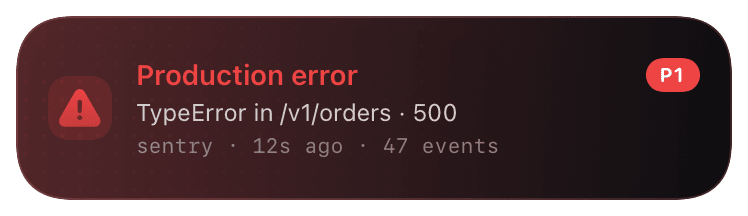
Notification: "Sentry · <project>" - title is the issue title, body is the first stack frame + event count. Severity-tinted (error red, warning yellow). Tap to deep-link to the Sentry issue page. With activity mode: a persistent red card showing the issue, count, and time range - stays until manually dismissed.
Troubleshooting
- Alert fires in Sentry but no Chirp notification.
- Sentry's webhook delivery log lives under Settings → Developer Settings → your Internal Integration → Webhook Logs. If the log is empty, the webhook action isn't actually attached to the alert rule. If it shows non-2xx, the URL or key is wrong.
- I'm getting too many pings.
- Sentry alerts are noisy by default. Common scoping: environment = production, level >= error, frequency >= 100 events / 1h (suppresses single-event spikes). Move dev-env errors to a different inspector or disable webhook on those rules entirely.
- Activity-mode card never closes.
- Sentry doesn't fire a "resolved" event for issues by default. Either close it manually from the lock screen (long-press → dismiss), or set up a second alert rule on issue resolution with
&action=endappended to the URL.